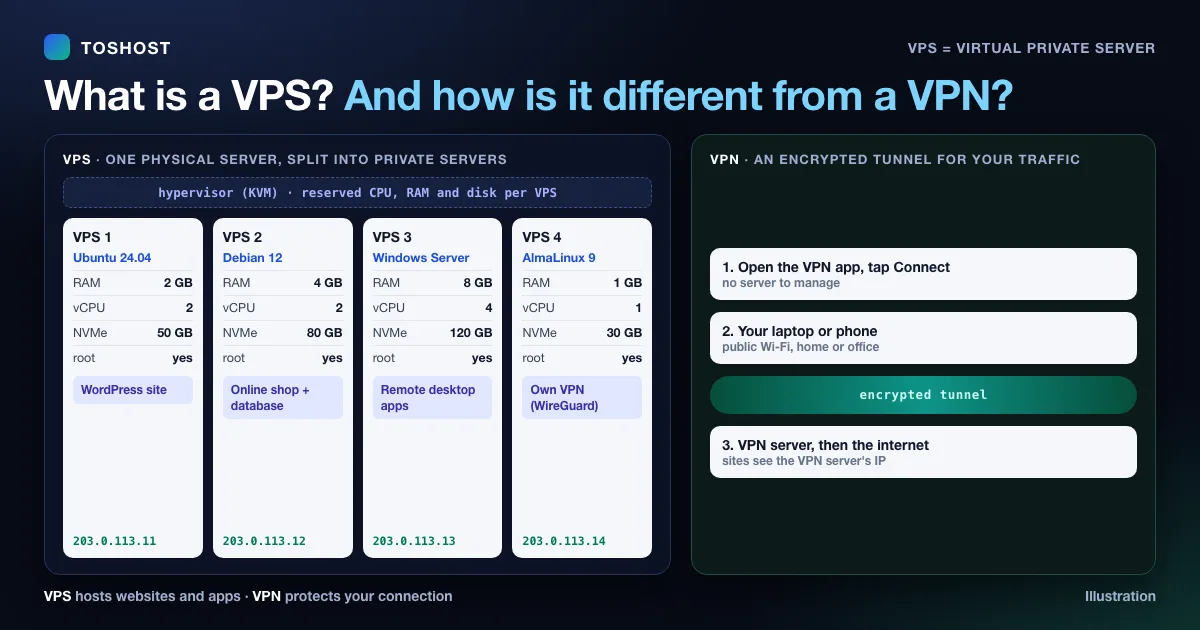
A VPS (Virtual Private Server) is a virtual machine that runs on a powerful physical server and behaves like a server of its own. It has its own operating system, its own reserved share of CPU, RAM and storage, its own IP address and full administrator (root) access. You rent it from a hosting company to run websites, apps, databases or remote desktops.
A VPS is not the same as a VPN. A VPS is a server you rent to run things. A VPN is an encrypted connection that protects or reroutes your internet traffic. They are often confused because the names are one letter apart.
Short version:
- VPS full form: Virtual Private Server.
- What you get: a slice of a physical server, with its own OS, guaranteed resources, root access and an IP address.
- Where it sits: between shared hosting (cheap, but you share everything) and a dedicated server (a whole machine, at a much higher price).
- VPS vs VPN: a VPS hosts things; a VPN hides or encrypts your connection. You can turn a VPS into your own VPN, but you can't host a website on a VPN.
VPS full form and meaning
VPS stands for Virtual Private Server. Each word tells you something:
- Virtual: it is software, not a separate box. One physical server is divided into several virtual machines.
- Private: your share of CPU, RAM and disk is reserved for you, and other customers on the same machine can't see your files or processes.
- Server: it does everything a normal server does. You choose the operating system, install any software and keep it running 24/7.
In Bangla: VPS এর পূর্ণরূপ হলো Virtual Private Server (ভার্চুয়াল প্রাইভেট সার্ভার), অর্থাৎ একটি শক্তিশালী সার্ভারকে ভাগ করে তৈরি করা আপনার নিজস্ব ভার্চুয়াল সার্ভার। In Malay it is a pelayan peribadi maya.
How a VPS works
A hosting company runs large physical servers in a data centre. Software called a hypervisor splits each machine into separate virtual servers and gives each one a fixed amount of resources. A common hypervisor is KVM, which is built into Linux and is what our KVM Cloud VPS uses.
With KVM, each VPS runs its own kernel and its own operating system. It can be Ubuntu, Debian, AlmaLinux or Windows Server, and one customer's server can't affect another's settings. Some cheaper providers use container-based virtualisation instead. It is lighter, but every container shares the host's kernel, so you can't run Windows or load your own kernel modules.
When you buy a VPS you usually get:
- a fixed number of vCPU cores, an amount of RAM, and SSD or NVMe storage;
- at least one dedicated IPv4 address;
- root access (Linux) or Administrator access (Windows), so you can install anything;
- a monthly bandwidth allowance and a port speed;
- a choice of data centre location.
VPS vs VPN: what is the difference?
| VPS (Virtual Private Server) | VPN (Virtual Private Network) | |
|---|---|---|
| What it is | A server you rent | An encrypted tunnel for your internet traffic |
| What it is for | Hosting websites, apps, databases, bots, remote desktops | Privacy on public Wi-Fi, reaching an office network, changing the location your traffic appears to come from |
| What you control | The whole server: OS, software, firewall, files | Only your connection; the VPN company runs the servers |
| Who uses it | Website owners, developers, businesses | Anyone who wants a private connection |
| Typical setup | Log in over SSH or Remote Desktop and install software | Install an app and press Connect |
Can you use a VPS as a VPN? Yes. Many people install WireGuard or OpenVPN on a small VPS to get a private VPN that only they use. The VPN then exits from your VPS's IP address and location. Two things to keep in mind: the VPS is registered to you, so it does not make you anonymous; and your hosting provider's acceptable-use policy still applies to everything that goes through it.
VPS vs shared hosting vs dedicated server
| Shared hosting | VPS | Dedicated server | |
|---|---|---|---|
| Resources | Shared with many other sites | Reserved share of one machine | The whole machine |
| Root access | No | Yes | Yes |
| Install your own software | Only what the host allows | Anything | Anything |
| Performance | Can slow down when neighbours get busy | Predictable | Highest |
| Who looks after the server | The host | You, or the host on a managed VPS | You, or the host if managed |
| Cost | Lowest | Middle | Highest |
| Best for | A first website or a small blog | Growing sites, apps, several sites, custom software | Heavy traffic, large databases, strict isolation needs |
A cloud VPS is a VPS whose storage and resources can be resized easily, often without moving to a new server. For most buyers the words "VPS" and "cloud server" mean much the same thing today.
When do you need a VPS?
Shared hosting is fine for a simple website. A VPS starts to make sense when:
- your site has outgrown shared hosting: it slows down at busy times, or you keep hitting CPU and memory limits;
- you need software shared hosting won't run: Node.js, Python, Docker, a custom PHP version, Redis, or a background worker;
- you run automation or AI tools that must stay on 24/7, such as n8n or an AI agent;
- you need a Windows server for software that only runs on Windows, or a remote desktop (see our Windows RDP plans);
- you host several websites or client sites and want them under one control panel;
- you need a fixed IP address or full control over the firewall and security settings.
Managed or unmanaged VPS?
With an unmanaged (self-managed) VPS you get the server and root access, and you handle updates, security and backups yourself. It is the cheapest option if you are comfortable on the command line.
With a managed VPS, the hosting company's engineers set up the server and look after it: updates, monitoring, hardening and backups. You get the power of a VPS without needing server skills. We compare the two in detail, with a worked cost example, in managed vs unmanaged VPS. You can also get a free control panel such as aaPanel on a self-managed VPS to handle sites, SSL and databases from a browser.
How to choose a VPS
- Pick the location closest to your visitors. Distance adds delay to every page load. For visitors in Bangladesh, a Dhaka server on the local BDIX exchange keeps traffic inside the country (see BDIX VPS). For Malaysia and the rest of South-East Asia, Singapore is the regional hub (see our managed VPS for Malaysia and Singapore VPS).
- Check the virtualisation. KVM gives you your own kernel and lets you run Windows or any Linux distribution.
- Size the RAM to your work. As a rough guide: 1 GB for a small site with a lightweight panel; 2 GB for WordPress or a small online shop; 4 GB or more for WooCommerce stores, several sites, or apps with a database and a cache.
- Look for NVMe storage. It is much faster than older SATA SSDs for databases and busy sites.
- Ask about backups. Find out whether backups are included, how often they run, and where they are stored.
- Decide who will manage it. If no one on your team works with Linux, a managed VPS will cost less than the time you'd lose fixing problems.
- Read the renewal price. Some hosts advertise a low first-term price that rises sharply at renewal.
Is a VPS secure?
A VPS is isolated from other customers, but its security depends on how it is run. On any VPS:
- keep the operating system and software updated;
- log in with SSH keys instead of passwords, and turn off password login for root;
- allow only the ports you need in the firewall;
- keep off-server backups.
On a managed VPS the hosting company does this for you. Our guide to keeping a Windows VPS secure covers the Windows side.
Frequently asked questions
What is the full form of VPS?
VPS stands for Virtual Private Server: a virtual server with its own operating system, reserved resources and root access, running on a shared physical machine.
Is a VPS the same as a VPN?
No. A VPS is a server you rent to host websites and applications. A VPN is an encrypted connection that protects your internet traffic. You can set up your own VPN on a VPS, but they are different things.
Is a VPS a cloud server?
Mostly, yes. A cloud VPS is a virtual server that can be resized easily. In everyday use, "VPS" and "cloud server" usually mean the same kind of product.
Do I need technical skills to use a VPS?
For an unmanaged VPS, basic Linux command-line skills help. With a managed VPS or a control panel such as aaPanel or cPanel, you can manage websites from a browser without using the command line.
What is a Windows VPS?
A VPS that runs Windows Server instead of Linux. You connect to it with Remote Desktop (RDP) and use it like a Windows PC that stays online 24/7, for example to run Windows-only software.
How much RAM does a VPS need for WordPress?
2 GB is a comfortable starting point for one WordPress site. Move to 4 GB or more for WooCommerce, several sites, or heavy plugins.