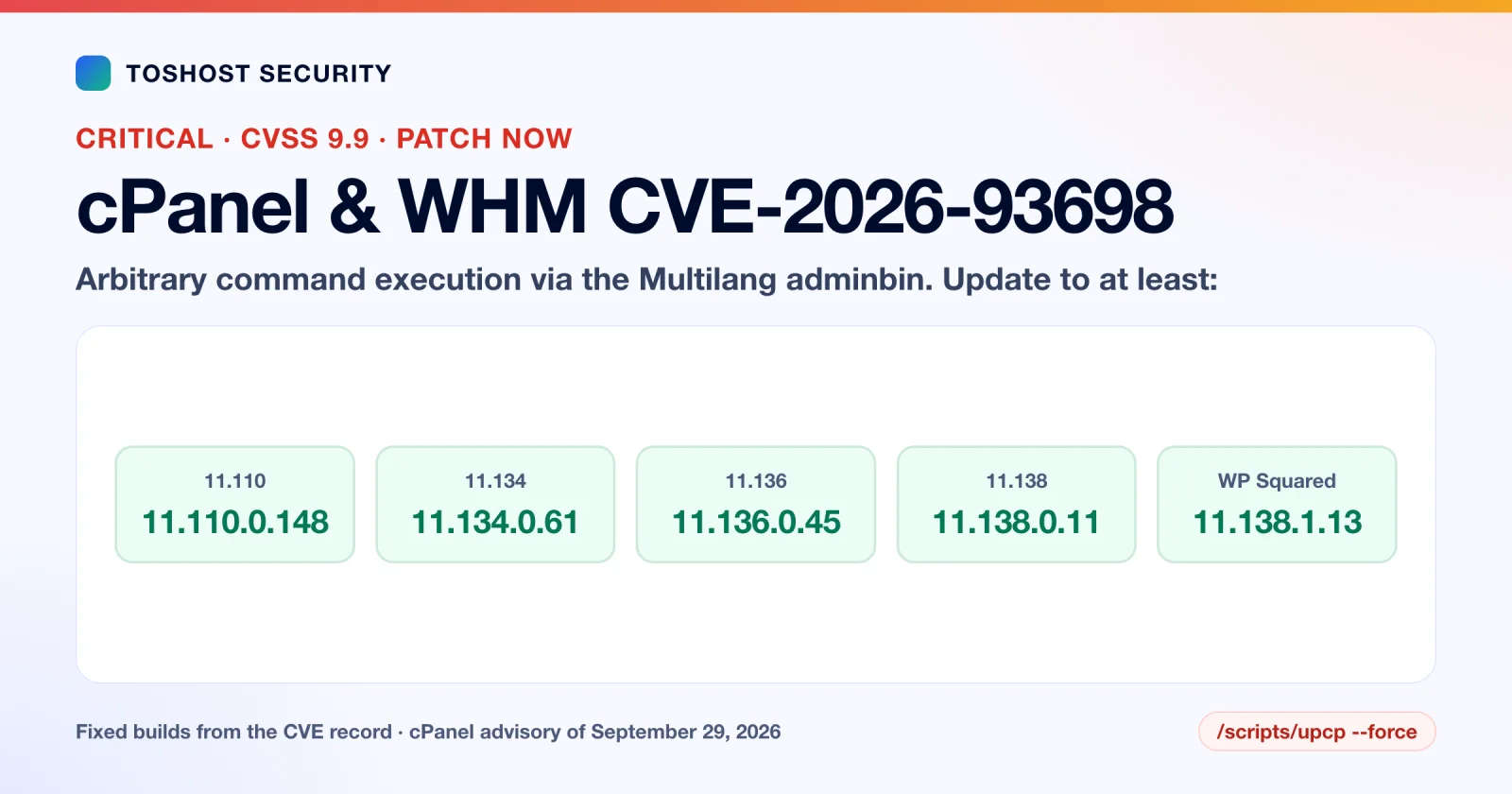
On September 29, 2026, cPanel shipped fixes for three security flaws in cPanel & WHM. One of them, CVE-2026-93698, scores 9.9 out of 10 and lets arbitrary commands run on the server through a component called the Multilang adminbin. If your server runs cPanel and has not updated since then, it is vulnerable. The fix is a single command and takes a few minutes.
This guide gives you the exact fixed builds, the commands to check and update, what we know and do not know about exploitation as of October 3, 2026, and a checklist for deciding whether anyone got in before you patched. It is written for people who run their own cPanel server (VPS or dedicated) and for hosting customers who want to ask their provider the right question.
Short version:
- Check your build with
/usr/local/cpanel/cpanel -V. You are safe from all three flaws on 11.110.0.148, 11.134.0.61, 11.136.0.45, 11.138.0.11 (or WP Squared 11.138.1.13) or any later build. - Update with
/scripts/upcp --force, then check the build again. - As of today we found no report of this flaw being exploited and no public proof-of-concept. That can change quickly, so patch now instead of waiting for a headline.
- If your server was running an old build and holds customer data, spend ten minutes on the compromise checklist below. If anything looks wrong, treat the server as compromised.
What cPanel fixed on September 29
Three CVEs were published on October 2, 2026, all fixed by the same cPanel release. The details below come from the CVE records themselves.
| CVE | Where | What it is | CVSS |
|---|---|---|---|
| CVE-2026-93698 | Multilang adminbin | Insufficient validation lets arbitrary commands run on the server | 9.9 (Critical) |
| CVE-2026-93029 | WHM > Manage SSL Hosts | Stored cross-site scripting that runs code in a WHM admin's session | 9.0 (Critical) |
| CVE-2026-93697 | WHM > Mass Modify Accounts | Stored cross-site scripting that runs code in a WHM admin's session | 9.0 (Critical) |
The command-execution flaw is the one to worry about. Its CVSS vector reads AV:N/AC:L/PR:L/UI:N/S:C: reachable over the network, low complexity, low privileges required, no user interaction, and a changed scope. Our reading of "low privileges" is that the attacker needs some kind of login, not necessarily an administrator one. On a server that hosts other people's accounts, that is the dangerous case, because anyone with an ordinary hosting account (or a stolen customer password) starts with the access the attack needs. Treat that as our interpretation of the score, not a statement from cPanel.
The two XSS flaws need a WHM administrator to open a page that an attacker has poisoned, which is why their vector includes user interaction. They matter because an administrator session can do almost anything on the server.
The flaw was reported through HackerOne by a researcher credited as rz1027. The scores above are the ones HackerOne, as the CVE assigner, published; the US National Vulnerability Database had not yet done its own analysis on October 2 (it listed the entry as "Deferred").
Which builds are fixed
cPanel & WHM versions below these builds are affected. cPanel's own changelogs list each of these builds with the date 2026-09-29 and the label "Targeted Security Release":
| Branch | Fixed in |
|---|---|
| 11.110 | 11.110.0.148 |
| 11.134 | 11.134.0.61 |
| 11.136 | 11.136.0.45 |
| 11.138 | 11.138.0.11 |
| WP Squared 11.138.1 | 11.138.1.13 |
If your build is on a branch that is not in this table, the CVE records list no fix for it. Move the server to a supported update tier (WHM > Server Configuration > Update Preferences) and run the update below.
A note on sources: several articles and at least one reseller knowledge-base page list slightly different build numbers. The table above matches the CVE record published with cPanel's advisory. When in doubt, take the numbers from the CVE record or cPanel's own advisory, not from a summary.
Check your version and update
Log in over SSH as root, then:
# 1. Which build are you on?
/usr/local/cpanel/cpanel -V

# 2. Is automatic updating even on?
grep -E '^(CPANEL|UPDATES)=' /etc/cpupdate.conf

# 3. Update now instead of waiting for the nightly job
/scripts/upcp --force

# 4. Confirm the new build and read the end of the update log
/usr/local/cpanel/cpanel -V
tail -n 100 /var/cpanel/updatelogs/last
If UPDATES= in /etc/cpupdate.conf says manual or never, your server does not update itself, and it is probably behind on more than this one release. Set it to daily unless you have a specific reason not to.
Run upcp inside screen or tmux so a dropped SSH session does not interrupt it. cPanel services restart during the update, so expect a short interruption of the control panel.
Hosting customer, not server owner? You cannot run these commands on shared hosting. Ask your provider two things in writing: which cPanel build the server is on today, and the date it moved to a fixed build. A provider that cannot answer in a day has not been watching.
Is it being exploited?
Here is what we could confirm on October 3, 2026:
- None of the sources we read report active exploitation of CVE-2026-93698.
- Those reports mention no public proof-of-concept code, and a GitHub search for the CVE ID on October 3 found no repositories.
- None of the three CVEs was in CISA's Known Exploited Vulnerabilities catalog in its October 2 release, the latest we could check.
That is a snapshot, not a guarantee. The reason to move today is cPanel's own recent history. In late April 2026, a different flaw, CVE-2026-41940 (a login authentication bypass), was added to CISA's catalog the day after its CVE was published. Security press reports on May 4 said that researchers had seen more than 1,000 exploitation attempts and that Shadowserver data suggested more than 44,000 IP addresses were likely compromised. Once a serious cPanel bug has details attached, scanners follow.
Was your server hit before you patched?
If the server was on a vulnerable build, run through this. None of these checks is proof of safety on its own, but any hit is a reason to stop and investigate. Expect some noise from the update you just ran, so look for changes you cannot explain.
# Extra root-level (UID 0) accounts. Only "root" should appear.
awk -F: '$3==0 {print $1}' /etc/passwd

# Unfamiliar SSH keys for root
cat /root/.ssh/authorized_keys

# Library injection. This file should normally not exist or be empty.
cat /etc/ld.so.preload

# Recent logins and where they came from
last -a | head -30

# Cron jobs: root and every account
crontab -l
ls -la /var/spool/cron/

# Newly created hosting accounts, newest first
ls -lt /var/cpanel/users | head -20

# Things listening on the network
ss -tlnp

# Modified system packages (RPM-based servers)
rpm -Va 2>/dev/null | grep -E '^..5' | grep -E ' /(usr/)?(s?bin|lib64?)/' | head -40
Then read the panel logs for the week around September 29 and after:
less /usr/local/cpanel/logs/access_log
less /usr/local/cpanel/logs/login_log
less /usr/local/cpanel/logs/error_log
Look for logins from addresses you do not recognise, requests to unusual internal paths from ordinary account users, and errors that cluster around one account. Also look at what each customer account has been doing: a new cron job, a new PHP file in a folder that should hold only images, or a fresh admin user in a WordPress install can be the follow-up to a break-in.
Be careful about what a clean result means. If an attacker reached root, they can hide processes, files and network connections from the very commands above, which is how an LD_PRELOAD rootkit works. A clean result on a server you already suspect is weak evidence. A hit on any check is strong evidence.
If you find something
- Do not clean in place and carry on. If root was reached, nothing on that machine can be fully trusted, including the tools you use to check it.
- Preserve evidence. Snapshot the server or copy the logs and suspicious files off it before changing anything.
- Move the sites to a clean server (a rebuilt or new install on a fixed cPanel build), restoring from a backup taken before the first sign of intrusion, then scanning the restored sites again, because the sites themselves can carry backdoors.
- Rotate everything that lived on the server: root and account passwords, SSH keys, database passwords, API tokens, and every WordPress admin password and salt. Customers whose passwords were on the box should be told.
- Check each website for reinfection sources. Cron jobs, modified theme files, must-use plugins and rogue admins are where it hides. Our guide to why WordPress malware keeps coming back lists them in order.
Reduce the damage of the next one
Patching fixes this flaw. These steps make the next one less likely to be a disaster:
- Keep automatic updates on. With
UPDATES=daily, cPanel normally installs a security release like this one without you doing anything. - Restrict who can reach WHM. Allow ports 2086 and 2087 only from your own IP addresses or a VPN, at the firewall. This reduces exposure to the admin-side XSS flaws. It is not a fix for a flaw reachable from an ordinary account, so it does not replace patching.
- Turn on two-factor authentication for WHM and cPanel logins. Here is our 2FA setup guide for cPanel and WHM.
- Do not give accounts you do not trust a place on a server you care about. A cPanel account is a login on your machine.
- Keep backups off the server and test a restore, so a rebuild is a routine job and not a crisis.
When to get help
You can patch this yourself in five minutes. The checklist is harder, because the useful answer is not "did a command print something" but "can I trust this machine". Get a specialist when:
- The server hosts customers or client sites and you found anything unexplained above.
- You were on an old build for weeks and cannot show it was not touched.
- You need the sites cleaned and moved without reinfecting the new server.
That is the work of our Full Account & Server Cleanup: a flat $199, one time, covering a whole hosting account or server, with credential rotation, hardening, a written incident summary and 30 days of monitoring afterwards. If an attack is active or several servers are involved, Emergency Response starts at $499 and is scoped to the incident. A single hacked WordPress site is our $59 WordPress malware removal.
Flat one-time fees, no subscription. Order straight from this page:
| Plan | Best for | Price | |
|---|---|---|---|
| Full Account & Server Cleanup | A whole hosting account or a server | US$199 | Order now |
| Emergency Response | An active attack, or several sites or servers | from US$499 | Order now |
| WordPress Malware Removal | One hacked WordPress site | US$59 | Order now |
Checkout is in US dollars. Emergency Response is a starting price; the final invoice is scoped to the incident. See all security services
Sources
- CVE-2026-93698 record (CVSS vector, affected and fixed builds, finder credit); the CVE-2026-93029 and CVE-2026-93697 records.
- cPanel's advisory for CVE-2026-93698, linked from the CVE record.
- Security press coverage, for exploitation status as of October 2026 and for the May 2026 cPanel exploitation (CVE-2026-41940).
Last updated October 3, 2026. We will update this page if exploitation is reported.
Frequently asked questions
What is CVE-2026-93698?
A critical flaw (CVSS 9.9) in the Multilang adminbin component of cPanel & WHM. Insufficient validation allows arbitrary commands to be executed on the server. cPanel fixed it on September 29, 2026, and the CVE was published on October 2, 2026.
Which cPanel versions are fixed?
11.110.0.148, 11.134.0.61, 11.136.0.45 and 11.138.0.11, or any later build, plus WP Squared 11.138.1.13. Anything older on those branches is affected.
How do I update cPanel to the fixed version?
Log in as root over SSH and run /scripts/upcp --force, then confirm the build with /usr/local/cpanel/cpanel -V. Also check that UPDATES in /etc/cpupdate.conf is set to daily so future releases install automatically.
Is CVE-2026-93698 being exploited?
As of October 3, 2026, the reports we read did not describe active exploitation or a public proof-of-concept. Treat that as temporary and patch now.
How do I know if my cPanel server was compromised?
Check for extra UID 0 accounts, unknown root SSH keys, a /etc/ld.so.preload file, unfamiliar cron jobs and new hosting accounts, and read the cPanel access and login logs for the days after September 29. A clean result is weak evidence if you already suspect an intrusion, because root-level malware can hide from those commands.
I am on shared hosting. Do I need to do anything?
You cannot patch the server yourself. Ask your host which build the server runs and when it was updated, and change your cPanel password and enable two-factor authentication.
How much does cleaning a compromised cPanel server cost?
Toshost's Full Account and Server Cleanup is a flat US$199, one time, with 30 days of monitoring. Emergency Response for active attacks or multiple servers starts at US$499.