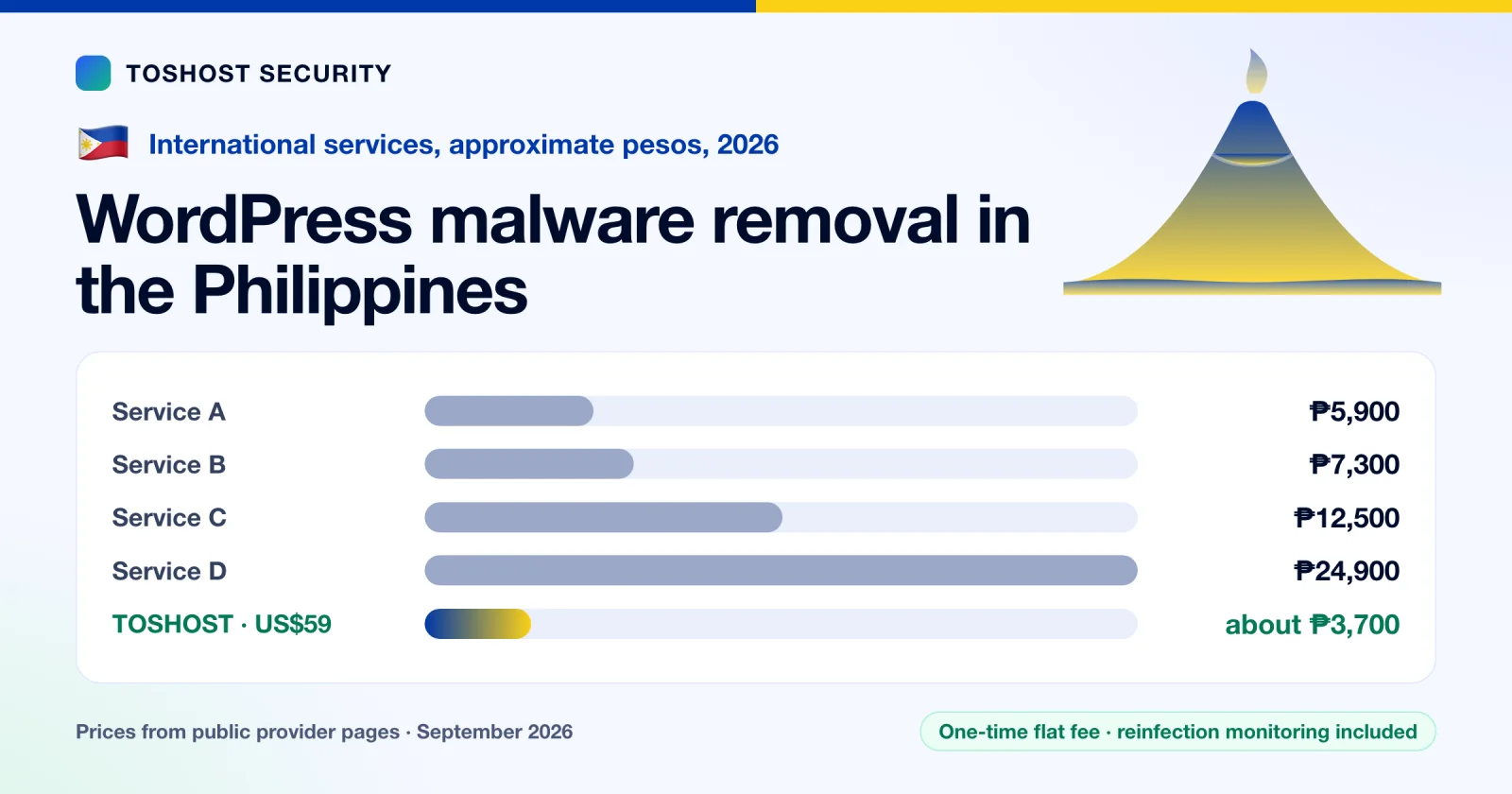
Quick answer: cleaning one hacked WordPress site costs about ₱5,900 to ₱24,900 from the international services we checked. Our flat fee is US$59 (about ₱3,700). Prices were read from each provider's own page in September 2026. What is included, and whether the provider re-cleans a reinfected site for free, matters more than the headline price. Jump to our prices and order.
If your WordPress site in the Philippines has been hacked, redirects visitors, shows spam, or has been flagged by Google or your host, the first question is usually what a cleanup costs and who to trust with it. This guide compares what different providers charge, what each one includes, and how to judge a quote.
How we checked: we read each provider's own pricing page in September 2026. Where a page does not state something, such as tax or a reinfection policy, we say so and do not guess. Prices change, so confirm with the provider before you pay. We sell a malware removal service too, and it is listed below under the same rules.
Short version:
- Ask what is included. Deleting infected files is the cheap part. Credential rotation, finding what recreates the malware, blacklist requests and a written report are what stop it coming back.
- Ask about reinfection. Several providers give 30 days of free repeat cleaning, and one Thai provider publishes a full year. International service A's one-time plan says it does not cover re-infections.
- Do not restore an old backup over an infected site before you know how the attacker got in.
Philippine-based providers
We searched for Philippine-based providers that publish a malware removal price and found none we could verify, so the comparison below is with international services that work remotely. If you prefer a local freelancer or agency, ask for a written quote that lists exactly what is included.
What international services charge
These work remotely and are priced in US dollars, so they are an option from the Philippines. Read in September 2026.
| Provider | Price (US$) | About (₱) | Turnaround | Reinfection terms |
|---|---|---|---|---|
| International service A (one-time cleanup) | US$98 (regular US$150) | ₱6,100 | First response estimate 30 hours | Not covered. The page says the plan does not cover re-infections. |
| International service B | US$95 (+US$29 for Google blacklist removal) | ₱5,900 | Within 24 hours | No specific re-cleanup guarantee stated |
| International service C | US$117 per site (US$97 per site for several sites) | ₱7,300 | Not stated on the page | Repeat cleanups free if reinfected within 30 days |
| International service D | US$119 per WordPress site (US$199 other CMS) | ₱7,400 | Usually up to one day | Free 30-day help with reinfection |
| International service E | US$200 | ₱12,500 | Usually 24 to 48 hours | Free re-remediation within 14 days, 30 days if you follow their security recommendations |
| International service F | US$399 | ₱24,900 | Same-day aim | Free restore if hacked again within 30 days |
Approximate amounts use mid-market rates of about 62.3 PHP to the US dollar in late September 2026. Your bank or card will use its own rate.
International service A's page also lists US$150 as the regular price for a single site, with US$98 as the current price. Its subscription plans, which include unlimited cleanups, start at US$199.99 a year.
What drives the price
- How many sites. One WordPress install is a small job. Several sites in one hosting account, all sharing the same infection, is a different one.
- Depth of the infection. Files only, or files plus database, plus scheduled jobs, plus rogue admin accounts.
- Speed. Same-day or one-hour response usually costs more.
- What is bundled. Hardening, backups, blacklist requests, a written report, monitoring afterwards.
- The guarantee. A free re-clean window is a cost the provider is pricing in.
What a proper cleanup includes
Deleting the malicious files is the easy 20 percent. Ask whether the quote covers all of these:
- Finding and removing what recreates the malware: scheduled jobs, must-use plugins, edited theme files and other sites on the same account. We explain the five usual hiding places in why WordPress malware keeps coming back.
- Removing unknown administrator accounts.
- Rotating every credential (WordPress, hosting panel, SFTP, database) after the malware is gone, and resetting the security keys.
- Blacklist and browser-warning removal requests.
- Hardening so the same door does not open twice.
- A written report of what was found.
Our option: TOSHOST malware removal
Flat one-time fees, no subscription. Order straight from this page:
| Plan | Best for | Price | |
|---|---|---|---|
| WordPress Malware Removal | One hacked WordPress site | US$59 (about ₱3,700) | Order now |
| Full Account & Server Cleanup | A whole hosting account or a server | US$199 (about ₱12,400) | Order now |
| Emergency Response | An active attack, or several sites or servers | from US$499 (about ₱31,100) | Order now |
Checkout is in US dollars. Peso amounts are approximate. Emergency Response is a starting price; the final invoice is scoped to the incident.
Our WordPress malware removal is a flat one-time fee for one hacked WordPress site: US$59 (about ₱3,700). It includes a full malware and backdoor scan, malicious file removal, a check for reinfection in WordPress core and plugins, rotation of WordPress admin, database and hosting credentials, Google and Norton blacklist removal requests, a written incident summary and 7 days of reinfection monitoring.
If the whole hosting account or the server is compromised, the Full Account and Server Cleanup is US$199 (about ₱12,400) and includes a full-account forensic scan, a rebuild from a clean base for deeper compromises, an authorized-key and user-account audit, firewall hardening, backup setup with a restore test, and 30 days of monitoring. For an active attack or several servers, there is an Emergency Response tier at US$499 (about ₱31,100), scoped to the incident.
What to weigh honestly. We work remotely and have no local office or phone number in the Philippines. The store prices this service in US dollars for the Philippines. Philippine pesos are not offered at checkout, so your card or bank converts the amount. Choose a Philippine-based freelancer or agency if you want to pay in pesos through local channels, work in Philippine business hours, or get in-person help. Ask for a written quote and for their reinfection terms. If you mainly want the cleanup done properly at a low flat fee, that is what ours is for.
If customer data may have been exposed
If personal data of customers may have been exposed, the Philippines' Data Privacy Act of 2012 may require you to notify the National Privacy Commission and the affected people within 72 hours of knowing about a reportable breach, for example one involving sensitive personal information or data that could enable identity fraud. Ask your legal adviser what applies to your business. This is general information, not legal advice.
Related regional guides: Malaysia, Australia, New Zealand. For real examples, see what we found in five real cleanups.
Sources checked in September 2026
Every price in this guide comes from the provider's own public pricing page, checked in September 2026. We have left the provider names out; the figures are as published.
Frequently asked questions
How much does WordPress malware removal cost in the Philippines?
International services we checked charge about ₱5,900 to ₱24,900 for one site. Our flat fee is US$59, about ₱3,700. What is included and the reinfection terms vary more than the price.
Why do malware removal prices vary so much?
The price depends on how many sites and how much of the hosting account is infected, whether the database is affected, how fast you need it done, and what else is bundled: credential rotation, hardening, backups, blacklist requests and monitoring afterwards. A cheap cleanup that only deletes files often ends in a reinfection.
Is a free re-clean guarantee worth asking for?
Yes. Several providers state 30 days of free repeat cleaning if the site is reinfected, and one Thai provider states a full year. If a quote does not mention it, ask. Malware that keeps coming back usually means something that recreates it, such as a cron job or a rogue admin, was missed.
Can an overseas provider clean my Philippines website?
Yes, if the work is done remotely. The provider needs access to your hosting account or SFTP and WordPress admin, and you should rotate every password afterwards. The trade-off is that you may not get phone support in your own time zone.
What should I do while I wait for the cleanup?
Take a full backup before anything changes, keep the copy separate from the site, change your hosting and email passwords from a clean device, and do not restore an old backup over the infected site. If the site is redirecting visitors, put it in maintenance mode.
Do I need to notify anyone if my Philippine website is hacked?
It depends on what data was exposed. Under the Data Privacy Act of 2012, a personal data breach involving sensitive personal information or data that could enable identity fraud, and likely to cause serious harm, may need to be reported to the National Privacy Commission and the affected people within 72 hours. Ask a legal adviser about your case.
Can I pay in Philippine pesos?
Not at checkout. The store prices the service in US dollars for the Philippines, so your card or bank converts the amount. At about 62.3 pesos to the dollar, US$59 is roughly ₱3,700.